Break Bricks 2 Player
Game Introduction
Break Bricks 2 Player delivers one of the smoothest 3D experiences you can enjoy directly in your browser. No downloads, no high-end hardware — just open your browser, hit play, and jump straight into the action.
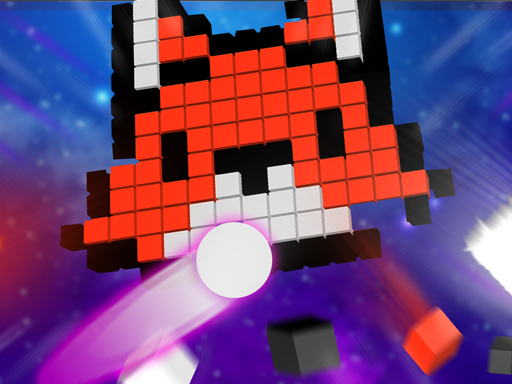
Destroy bricks from cubes! Throw the ball and let the game begin. Fall under the spell of colorful bricks. The balls destroy every cube they touch. You will encounter different shapes in each section. You have a total of 3 rights in the single player game. In the game for 2 people, you fight with your opponent for 5 rounds. You can see 3 different bonuses given to help you. One of the bonuses provides an increase in the number of balls. The other bonus is that it generates 3 new balls. Finally, there is a bonus for filling up your Health Bar. Try to catch these bonuses. When you are alone, click the 1 player button. If you want to spend fun minutes with your friends, click the 2-Player button. Play freely in endless mode. Hours of fun are waiting for you in the 3D brick breaking game. Let\\\\\\\'s play the game!
Unlike many modern games loaded with installers and microtransactions, Break Bricks 2 Player keeps things pure and accessible. It’s completely free, easy to learn, and respects your time and money. What makes players come back? The core gameplay — nothing else. The community is also welcoming, with players from around the world sharing strategies and enjoying the fun together.
Every session in Break Bricks 2 Player feels fresh. The challenges, your decisions, and the way each round unfolds create a unique experience every time. The more you play, the more you discover. Performance is reliable, loading is quick, and it runs flawlessly even on modest devices.
How To Play
Controls are intuitive on any device. Use mouse clicks on desktop, or tap and swipe naturally on mobile. Within minutes, the controls will feel like second nature.
Quick Start Guide
To start playing
Break Bricks 2 Player ,
simply click the play button above. No registration, no installation required.
The game works on all modern browsers and automatically adjusts to fit your screen perfectly.
Controls:
- Mouse / Touch: Click or tap to select options and interact with the game.
- Keyboard (if supported): Use arrow keys, spacebar, or WASD for additional control.
- Mobile: Swipe, tap, or hold on the screen to perform actions.
Pro Tips:
Don't worry about mastering everything at once. Experiment, explore, and learn at your own pace.
The game offers clear visual and audio cues — follow them to improve quickly. Most importantly,
have fun.
Troubleshooting:
Make sure JavaScript is enabled and your browser supports HTML5 Canvas. For the best mobile
experience,
a Wi-Fi connection is recommended. If anything seems off, a quick page refresh usually solves the
issue.